


Xeal EV Charging
3.065.00 Reviews
App Specs
- Version
- 6.5.1
- Updated On
- License
- Free
- Downloads
- 10,000+
- Developer
- Eve Energy Ventures Inc.
- Categories
- Auto & Vehicles
- Platform
- Android
Screenshots
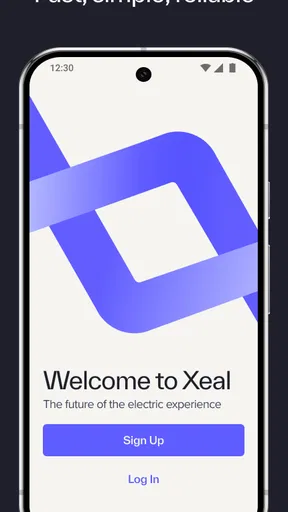
 Analysis by AppCompare
Finding an electric vehicle charger should feel easier than planning a trip around a half-remembered parking spot. That is the problem Xeal EV Charging tries to solve. It is a free Auto & Vehicles app from Eve Energy Ventures Inc., built around a simple phone-first interaction with compatible charging equipment. I approached it as a first-time driver would: install it, work out what the app expects at the charger, and see whether the process feels clear when I am standing beside a vehicle that needs power.
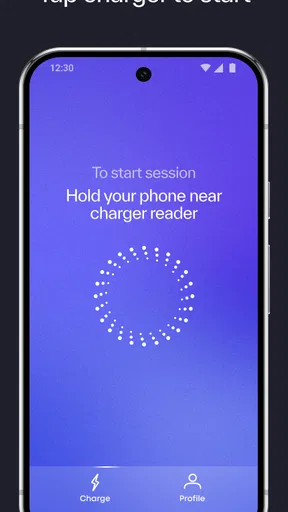
The central idea is straightforward. Instead of treating charging as a long sequence of menus, the app focuses on tapping a phone on the charger. That can be welcome when I am outside, carrying a cable, or trying to get moving without studying a complicated interface. At the same time, this is not a universal replacement for every charging service. Its usefulness depends heavily on encountering the charging equipment it is designed to work with and understanding the handoff between the app, the phone, and the physical charger.
What to expect before you arrive at a charger
Xeal EV Charging is best understood as a companion for a particular charging workflow rather than a broad driving assistant. The store summary presents it as a way to make EV charging fast, reliable, and easy, with the phone tap acting as the key action. In my view, that makes the app most appealing to people who regularly use compatible locations and want less friction at the point of charging.
The free price removes an obvious barrier to trying it. It also has an Everyone content rating, so the presentation is intended for a general audience rather than a specialist technical crowd. The app has been available since May 13, 2021, and the current version is 6.5.1. Those details matter less than the practical question: will the charger in front of you recognize the interaction your phone is prepared to make?
That is the first expectation I would set for a new user. Installing the app does not by itself turn every public charger into a Xeal charger. I would first identify whether the location supports this service, then install the app before arriving if possible. Doing that at home gives me time to sign in or complete any requested setup without standing in a busy parking area with a low battery.
The app has passed the ten-thousand-install mark and holds a 3.0 average from roughly ninety ratings, with more than sixty reviews. I would read that as a sign to keep expectations practical: some drivers clearly find the concept useful, but the experience may not be equally smooth on every phone, charger, or situation. A middling rating is not an automatic reason to avoid it, yet it is a good reminder to keep a backup plan for an important journey.
Who will get the most from it
I see the strongest fit for drivers who charge repeatedly at locations using Xeal equipment. For them, the value is not discovering a new feature every day; it is reducing the number of steps between parking and starting a session. A resident, employee, or regular visitor at a property with compatible chargers may appreciate that consistency more than a driver who uses a different network every week.
Worth Reading Before You Choose

EA SPORTS FC Mobile 26 Is a Bigger Football Game, but It Takes Time

Flipboard Shows What News Apps Must Do Beyond the Feed

Switching to Android Auto Means Rethinking Your Driving Routine

Google Calendar Makes a Crowded Week Easier to Manage

Ludo King Makes the Most of the Minutes Between Plans

Baby Panda World Brings Quick Play to Modern Phones, but Its Game Library Feels Busy
It is also a reasonable option for someone who dislikes creating a separate routine around charging. If tapping the phone is supported at the charger, the interaction can feel closer to using a contactless key than navigating a large application. That is a meaningful advantage when I am wearing gloves, working in bright sunlight, or simply trying to avoid typing while parked outdoors.
I would be more cautious if I wanted one app to plan every charging stop, compare every available network, or act as a complete road-trip tool. Xeal EV Charging is not the app I would choose solely for broad charger discovery or a detailed travel plan. A general EV route planner or a larger multi-network service may be better for those jobs, while this app can remain useful for the actual charging locations it supports.
Setting it up without unnecessary stress
My advice is to treat setup as a short preparation stage, not something to improvise after connecting the vehicle. Download the app on a compatible phone, open it while you have a stable connection, and move through the initial screens carefully. The goal is to reach a point where the app is ready for the charger interaction before the car is parked in the charging bay.
The minimum operating system listed for the app is Android 9. That is helpful for owners of older Android phones, although compatibility alone does not guarantee that every phone will behave identically at the charger. If you use an older device, I would test the process at a convenient location rather than making the first attempt during an urgent stop. Keeping the phone charged is equally sensible, because a phone-based charging action is not much help when the handset is nearly empty.
I would also avoid assuming that the phone tap means exactly the same thing as tapping a bank card. The app is the software part of the process, while the charger supplies the physical point of interaction. Hold the phone where the charger indicates, wait for the response, and give the system a moment before repeating the action. Rapidly tapping several times can make it harder to tell whether the first attempt worked or whether a second attempt has started a different step.
One useful habit is to prepare the app before plugging in, then connect the vehicle only when I am positioned correctly. That order gives me a clearer view of what changed after the tap. If I plug in first, walk away, and only then open the app, it becomes harder to separate a cable issue from an authorization issue or a phone-recognition issue.
The first successful charging action
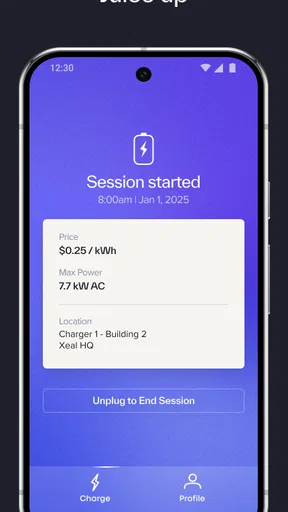
For a first attempt, I would choose a quiet charging session rather than a rushed one. Park carefully, confirm that the cable is connected as expected, open Xeal EV Charging, and follow the charger’s visible instructions. When the moment comes to tap, place the phone against the indicated area and wait for confirmation from the equipment or the app. The meaningful success is not merely opening the application; it is seeing the charging session begin and knowing which part of the process made that happen.
This is where the app’s focused design can work in its favor. There are fewer conceptual steps than with a service that asks me to search a map, select a connector, choose a payment method, and then activate the station through several screens. A phone tap can shorten that chain. The trade-off is that the physical charger becomes more important. If I am at the wrong unit or the equipment is not part of the supported setup, the app’s simplicity cannot compensate.
I would stay with the car long enough to confirm the start rather than walking away immediately after tapping. Look for the charger’s own indication that power is flowing and check the vehicle’s charging status. This is a small but important safety habit: it prevents a failed authorization or loose connection from becoming an hour of assumed charging time.
Another practical tip is to remember the exact position and timing that worked. At a regularly used site, that turns the first session into a repeatable routine. I would note whether the phone needed to be held close to a particular area, whether the app needed to be open, and which confirmation appeared first. These are not glamorous details, but they are the difference between a smooth second visit and unnecessary trial and error.
Where first-time users may hesitate
The most likely confusion is the boundary between the application and the charger. A user may open the app and expect a large “start” button, while the intended action is actually performed at the physical unit with the phone. Conversely, someone may tap the phone and assume the session is active without checking the vehicle. I recommend treating both sides as part of one process: prepare in the app, interact with the charger, then verify at the car.
Another source of friction is repeating an action too quickly. If the charger takes a moment to respond, a second tap may not solve anything. I would wait, read the charger’s message or light, and then decide whether to try again. If the result is still unclear, disconnecting and reconnecting without understanding the first state may create more uncertainty, so I would pause and inspect the setup first.
Phone position can matter as well. Contactless interactions are not always successful when the handset is inside a thick case, held at an angle, or placed away from the reader area. I would try a deliberate, steady tap rather than sweeping the phone around the charger. If the device has a wallet case or several cards stored close to the phone, simplifying that arrangement for the first test may make the result easier to interpret.
Connectivity is another everyday consideration. I would not begin a first session in a place where the phone is already struggling to connect, especially if I have no time to troubleshoot. The app’s promise is convenience, but convenience depends on the phone, the charger, and the service communicating properly. That is why a backup payment or charging option remains sensible for long trips, even if regular sessions at a familiar site are dependable.
How it compares with the usual alternatives
Compared with a charger network app built around maps and station search, Xeal EV Charging feels narrower and more immediate. A map-based alternative is usually better when I am deciding where to charge next, comparing locations, or planning an unfamiliar route. Xeal’s advantage appears after I am already at a supported charger and want the activation step to be quick.
Compared with paying directly at equipment that accepts a physical card, the phone-tap approach can reduce the need to handle a wallet. That may be especially convenient when the charger is outdoors or when I use the same site frequently. The downside is dependence on the phone and the app’s readiness. A card can sometimes be a simpler fallback when the handset is low on power, offline, or behaving unexpectedly.
Compared with a vehicle manufacturer’s charging application, this service may be more useful at a specific property or charging installation than inside a broader ownership dashboard. A manufacturer app can be preferable when I want vehicle information, trip planning, or charging controls in one place. I would keep Xeal installed when it is the tool that reliably starts the local charger, not because it necessarily replaces every other EV app on my phone.
Making the next session easier
After the first successful charge, I would focus on repeatability. Keep the app easy to reach, remember the charger’s tap area, and make verification part of the routine. The best outcome is not a dramatic feature set; it is a predictable sequence that I can complete without stopping to rethink each step.
For a regular commuter, that might mean using the app at a workplace or residential location and leaving broader route planning to another tool. For an occasional driver, it may mean opening the app before arriving and checking the charger’s instructions before connecting. In both cases, the useful insight is to separate finding a charger from starting a session. Xeal is most convincing in the second role.
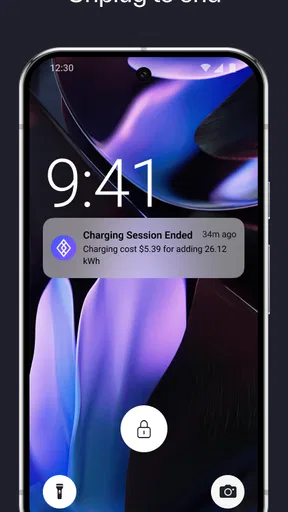
I would also judge the app over several ordinary sessions rather than one isolated attempt. A single successful tap proves that the basic workflow can work; repeated use tells me whether it fits my habits. Pay attention to how often I need to reopen the app, whether the charger confirms activation clearly, and whether I can tell when charging has ended. Those observations help decide whether this should be my primary local charging tool or simply one option among several.
The developer, Eve Energy Ventures Inc., has kept the product centered on EV charging rather than turning it into a crowded vehicle utility. I appreciate that focus, but it also means I should not expect the breadth of a full EV ownership suite. The current version, 6.5.1, is the one I would install when trying the service today, while Android users should remember that Android 9 is the stated minimum platform.
My recommendation for a first-time driver
I would recommend trying Xeal EV Charging if you already know that your regular charger supports it, especially when your priority is a quick phone-based start. Install it before the first visit, test it when you are not under pressure, and remain beside the vehicle until both the charger and the car confirm that power is flowing. That small preparation removes most of the anxiety from the first attempt.
I would skip making it my only charging solution if I travel through many unrelated networks or need advanced route planning. In that situation, a broader charging directory, a vehicle app, or a physical payment fallback will cover more situations. The app can still be useful at compatible locations, but its value is local and practical rather than universal.
Overall, I like the clarity of the phone-tap concept. It addresses a real moment of friction and can make a familiar charging location feel much less complicated. The main limitation is equally clear: the experience depends on the right charger and a prepared phone. For drivers who fit that use case, the simplest path is to prepare first, tap once, and verify the session before walking away. That is a modest promise, but when the car needs charging, modest and dependable can be exactly what I want.
Pros
- Simple map helps locate available EV charging stations nearby.
- Supports route planning around charging stops for longer journeys.
- Station details can help compare charging options before arrival.
- Useful for monitoring charging activity from a single mobile app.
- Clean interface makes essential charging information easy to find.
Cons
- Station availability may change before you reach the selected charger.
- Coverage and features can vary depending on your location.
- Some chargers may require separate operator apps or accounts.
- Charging prices and session fees may not always be displayed clearly.
- A reliable internet connection is needed for maps and live station data.
FAQs for Xeal EV Charging
What is Xeal EV Charging, and what can I use it for?
Xeal EV Charging is a mobile app designed to help electric-vehicle drivers find and use compatible Xeal charging stations. From the app, you can typically view available chargers, check station details, start or stop a charging session, and review charging activity. It is particularly useful for locating charging options before arriving and managing a session without relying entirely on the station’s physical controls.
How do I start an EV charging session with the Xeal app?
After signing in, use the map or station search to select a nearby Xeal charger. Check the connector information and station status before arriving, then follow the in-app instructions to begin charging. Depending on the location, you may need to scan a QR code, select a specific port, or plug in before confirming the session. Always verify that charging has started successfully.
Does Xeal EV Charging require an account or payment information?
Some features may be available without creating an account, such as browsing charging locations, but starting a paid charging session generally requires user identification and a valid payment method. Registration requirements and accepted payment options can vary by station, property, or charging program. Before relying on the app for a trip, complete your profile and confirm that your payment details are current.
Can I see charger availability, pricing, and station details in Xeal EV Charging?
The app is intended to provide useful information about participating charging locations, including charger availability, connector types, operating status, and location details. Pricing may also be displayed, although rates can differ according to the property, time, membership terms, or local charging policy. Treat the information as a guide and review the final cost or applicable terms before starting a session.
What should I do if the Xeal charger or app is not working?
First, check your internet connection, confirm that Bluetooth or location permissions are enabled when required, and make sure the selected station and charging port match your vehicle. If the session does not begin, try restarting the app and following the station’s QR-code or on-screen instructions again. For payment, hardware, or access problems, use the support option in the app or contact the operator listed at the charging site.


